

QR Code for Retail Stores
A retail store QR code turns a shelf tag, window, or receipt into a one-scan link to a promotion, product details, your loyalty program, or reviews. Because it's dynamic, you swap this week's offer or a sold-out product's page once and every printed code updates instantly—no reprinting shelf talkers.
How QR codes work for retail store
You point the QR at whatever drives the sale—a discount landing page, a product detail page, a loyalty signup, or your online store—then print it on shelf tags, window decals, hang tags, and receipts. When a shopper scans with their phone camera, the current page opens instantly, so changing a promotion never means reprinting signage.
What your retail store QR opens
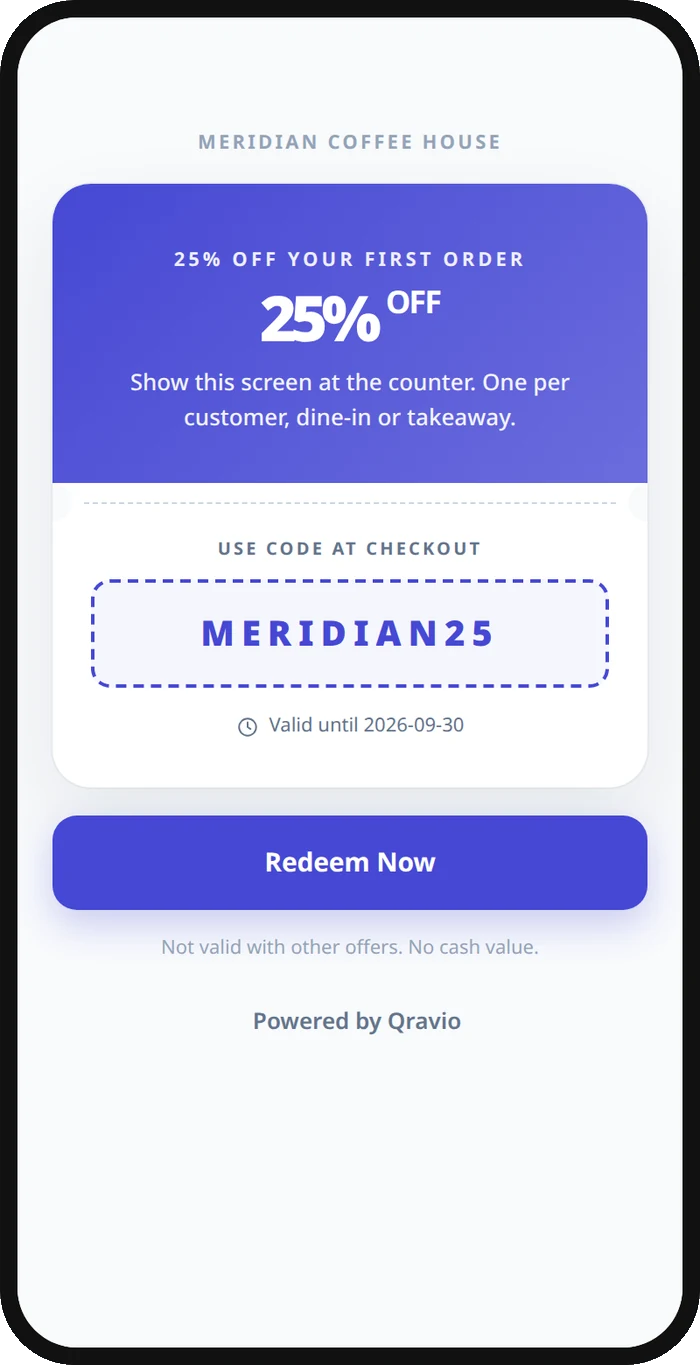
A real Qravio scan page, shown with demo content. Every part of it is editable after the code is printed.
Make your Retail Store QR code
Build it free below, then create an account to make it dynamic — edit it anytime and track scans.
Set up your Retail Store QR code
- 1Sign in to Qravio and create a dynamic QR pointing to a promotion, product page, loyalty signup, or your online store.
- 2Set the destination for the action you want in-store—claim an offer, see product details and stock, or join your rewards program.
- 3Customize the landing page with your store's logo and brand colors so it feels like a natural part of the shopping experience.
- 4Download a high-resolution PNG or SVG and print it on shelf talkers, window decals, hang tags, and receipts.
- 5Place codes where shoppers pause—the shelf edge, the window, the checkout—and change the offer behind them anytime from your dashboard.
Why use a Qravio QR code for retail store
Swap promotions without reprinting
Launch a weekend sale, rotate a featured product, or end an offer from your dashboard and every shelf tag and window decal updates at once. You stop paying to reprint signage each time a promotion changes.
Bridge the shelf to your online store
A scan can open the full product page—sizes, colors, reviews, and stock—so a shopper who can't find their size in-store buys it online instead of walking out empty-handed. It turns a missed sale into an online order.
Grow your loyalty list at the shelf
Point a code at your rewards signup so shoppers join from their phone while they're already buying. Capturing loyalty members at the moment of purchase beats hoping they sign up later from an email.
See which displays actually sell
Real-time scan analytics show which shelves, windows, and offers get scanned and when, so you can judge which endcaps and promotions earn their space and repeat what works.
Pro tip
Give each display its own code—window, endcap, checkout—so your analytics reveal which placements and promotions actually drive scans, then give your best performers more space and retire the ones nobody taps.
Retail Store QR code FAQ
What should a retail QR code link to?
Whatever moves the sale: a promotion or discount page, a product detail page with sizes and reviews, your loyalty signup, or your online store. Many retailers place different codes for different jobs—an offer at the window, product details on the shelf, and loyalty at checkout.
Can I change the promotion after printing the codes?
Yes. Qravio codes are dynamic, so the printed code points to a destination you edit anytime. Launch a new sale or end an old one from your dashboard and every shelf tag and window decal reflects it instantly—no reprinting signage.
Can shoppers buy online if an item is out of stock in-store?
Yes. Point the code at the product's online page so a shopper who can't find their size or color can order it on the spot from their phone. It's a simple way to recover sales that would otherwise walk out the door.
Do shoppers need an app to scan?
No. Modern iPhone and Android cameras read QR codes natively, so a shopper points their phone and taps the link. There's nothing to download, which keeps claiming an offer or joining your rewards program to a couple of taps.
Create your Retail Store QR code
Free to start. No watermark. Editable and trackable in under a minute.