Restaurant Menu QR Code
A restaurant menu QR code puts your menu on the customer's phone instead of on a laminated card. Qravio's version is dynamic: the printed pattern holds a short Qravio link, and on scan we serve a fast, mobile-first page built from the categories, dishes and prices you saved in your dashboard. Because the menu lives in the dashboard rather than in the printed pixels, raising a price, marking paneer sold out for the evening, or adding a monsoon special takes about twenty seconds and reaches every table tent, door sticker and delivery bag you have already printed. It is a menu, not an ordering system — there is no cart, no checkout and no payment step, by design.
Open your live menu, editable any time
This one opens a page Qravio hosts for you — so you can change what people see after the code is printed, and watch every scan land. Sign up or log in to start building.
How a Restaurant Menu QR code works
You build the menu as categories with dishes under them — Starters, Main Course, Desserts — and each dish carries a name, a price, an optional description, an optional photo, a veg or non-veg mark and an availability toggle. If you already have the menu typed somewhere, paste it in: the importer reads one dish per line with the price at the end, understands rupee signs, commas and a trailing slash-dash, and treats a line with no price as a category heading, so a paste out of Word, Excel or a WhatsApp message usually lands correctly on the first try. It shows you what it understood before anything is saved, because a parser that guesses wrong has to be correctable rather than silent. Only a short Qravio link is encoded into the pattern. On each scan that link resolves at our edge and the page is assembled there, from a snapshot of your menu we keep next to the code — no call back to a server, no database query, no waiting on a slow connection in a basement dining room. The pages carry no JavaScript at all, which is the reason they open quickly on the five-year-old Android phone a real customer is actually holding. Three layouts ship: Classic, a text-first list with prices, which is the right default for a sixty-dish Indian menu with no photography; Photo Grid, two columns of dish cards for a cafe that has shot its food; and Accordion, collapsible categories with a jump bar, which is what a long menu wants. Editing takes effect on the next scan, and a dish you mark unavailable stays on the menu dimmed and labelled Sold out rather than vanishing, the same way a paper menu does not delete a dish when the kitchen runs out.
What people see after scanning
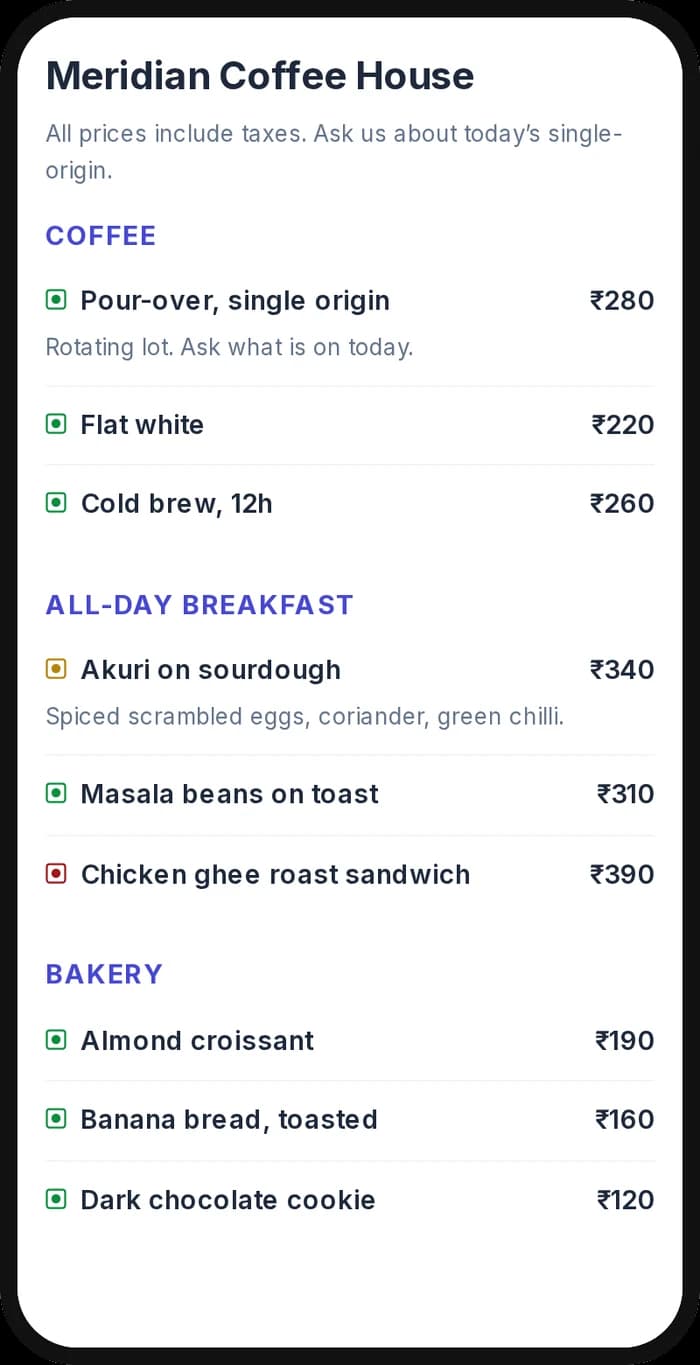
The page a Restaurant Menu QR code opens on a phone. Yours to design — colours, layout and content all change from the builder.
Popular uses
- Print one code on a table tent, and stop reprinting the whole set every time the price of oil, paneer or gas moves
- Mark a dish sold out from your phone at 8pm on a Saturday, so the waiter stops apologising for something the menu is still promising
- Run a lunch menu and a dinner menu as two codes on the same tent, each edited independently, instead of one card that is wrong for half the day
- Put the menu on the shutter, the door or a window sticker so somebody deciding on the pavement can read it before they walk in
- Add a QR to delivery bags, bill folders and packaging so a repeat order starts from your own menu instead of an aggregator's listing
- Give a cloud kitchen or a stall a menu that looks finished on day one, with no website, no app and no printing bill
- Hand a bar or cafe a seasonal specials board that changes weekly without a designer or a reprint
Why create your Restaurant Menu QR code with Qravio
Change a price without reprinting anything
This is the entire point. A menu printed into a static QR, or laminated onto a card, is frozen the moment it leaves the press — and menu prices in India do not stay still for a year. Here the dish list lives in your dashboard, so a price rise, a renamed dish, a new category or a withdrawn item is an edit on your phone. Every code already sitting on a table, a bag or a door starts showing the new menu on the very next scan, with nothing recalled and nothing reprinted.
Sold out is a toggle, not a scratched-out line
Turn a dish off and it stays on the menu, dimmed, with a Sold out label. That is deliberate: hiding the dish makes a regular think you stopped serving it, and makes them hunt through the menu for something that is simply finished for the evening. Turn it back on in the morning. No reprint, no sticker over the old price, no waiter explaining the same thing forty times a night.
Paste the menu in instead of typing it
Typing sixty dishes into a form one field at a time is an afternoon, and it is the single biggest reason digital menus get started and abandoned. Paste your existing menu — from Word, from Excel, from a WhatsApp message — and the importer separates dishes from category headings and pulls the prices out, handling the rupee signs and stray formatting people actually type. You review what it read before it becomes your menu, and fix anything it got wrong.
Built for the phone a customer actually has
The scan page carries no JavaScript whatsoever. Collapsing categories and the jump bar are done with plain HTML, photos load only as they come into view, and the whole page is served from the edge with no round trip to a server. That is what makes it open promptly on an old handset with two bars of signal in a basement dining room, which is the condition your menu will genuinely be read in — not on the newest phone on office wifi.
Veg and non-veg marks, and the layout your menu wants
Every dish can carry the standard green or brown mark, on by default, because for a great many Indian diners that mark is the first thing they look for and its absence is a reason to put the phone down. Pick Classic for a long text menu, Photo Grid if you have shot the food, or Accordion if the menu runs to several pages — and switch between them later without touching the dishes.
It is a menu, not an ordering system
There is no cart, no checkout, no payment step and no table number, and we do not plan to add them. A customer reads the menu and calls a waiter, exactly as they do with a paper card. We would rather say this plainly than let you discover it after printing: if you need table-side ordering, KOT printing or payments, this is not that product and you should buy one that is. What you get instead is a menu you can change from your phone, that loads fast, and that costs nothing per scan.
Restaurant Menu QR code FAQ
Can customers order or pay from the menu?
No, and that is a deliberate product decision rather than a missing feature. The menu shows dishes, descriptions, prices and availability; ordering, billing and payment stay with your staff and your existing till. Adding a cart would drag in table identifiers, kitchen printing, order state, refunds and payment compliance — a different product with a different price, and one that several companies already sell. If that is what you need, buy one of those. If what you actually needed was to stop reprinting menus every time a price moves, this is built precisely for that.
How fast does a price change reach the table?
Within about a minute. Saving pushes your menu out to our edge network, and the copy each location holds refreshes on a short cycle, so a scan a minute later shows the new price everywhere. There is nothing to reprint, redistribute or recall, and no version of the menu in circulation that you cannot reach — which is the difference between this and a laminated card or a menu frozen into a static QR.
How many dishes can one menu hold?
Up to 300 dishes across 30 categories, with a limit of 100 dishes in any one category. Those are technical limits rather than plan limits — they are the same on the free plan as on any paid one — and they exist because the whole menu is delivered to the phone on every scan, so an unbounded menu would make the page slower for every customer forever. If you genuinely run past them, usually a hotel with several outlets behind one code, the better answer is a separate QR per outlet: it loads faster, reads more clearly, and tells you which outlet people are actually scanning.
Do I need photos of every dish?
No, and for most Indian menus you should not try. The default Classic layout shows no photos at all, which is the right choice for a sixty-dish menu where you have shot three of them — a photo grid with most cards empty looks broken rather than sparse. Add photos only for the dishes you have good pictures of and pick the Photo Grid layout when most of the menu is covered. Dishes without a photo simply render as a card without one.
Who can see my menu and my dish photos?
Anyone who scans the code or opens the link — there is no login, which is the whole point of a menu. Dish photos are served from a public address as well, so treat anything you upload the way you would treat a picture on a printed menu or a hoarding. A menu is public information you are actively trying to publish; there is nothing here to keep private. What is not public is your scan data, which only you see in your dashboard.
What happens if my internet goes down at the restaurant?
Nothing, because your connection is not involved. The menu is served from our edge network directly to the customer's phone over their own mobile data or your guest wifi — no device in your restaurant is serving anything. A power cut or a dead broadband line at the shop does not take the menu down. What you would lose is your ability to edit it until you are back online, which is a very different problem from customers being unable to read it.
Can I use my own domain and remove Qravio branding?
Yes, on the plans that include custom domains and white labelling. The menu then loads from your own short domain and the footer carries your branding instead of ours. The menu type itself is available on every plan including the free one — the QR type is not the paywall here; the domain, branding and volume limits are.
Create your Restaurant Menu QR code
Free to start. No watermark. Make it dynamic to edit it later and track every scan.