

QR Code for Event Tickets
A QR code on an event ticket gives each attendee a scannable pass that opens their admission details, seat, tier, and entry info, when scanned at the gate or on their phone. With Qravio's dynamic code you can fix a venue or time change after tickets ship, track scans live, and never reprint.
How QR codes work for event ticket
Each ticket carries a Qravio QR that encodes a short link to a hosted ticket page showing the holder's event, date, gate time, seat or tier, and entry instructions. Door staff scan it for fast admission, and because the code is dynamic, you update venue, doors-open time, or instructions anytime without reissuing a single ticket.
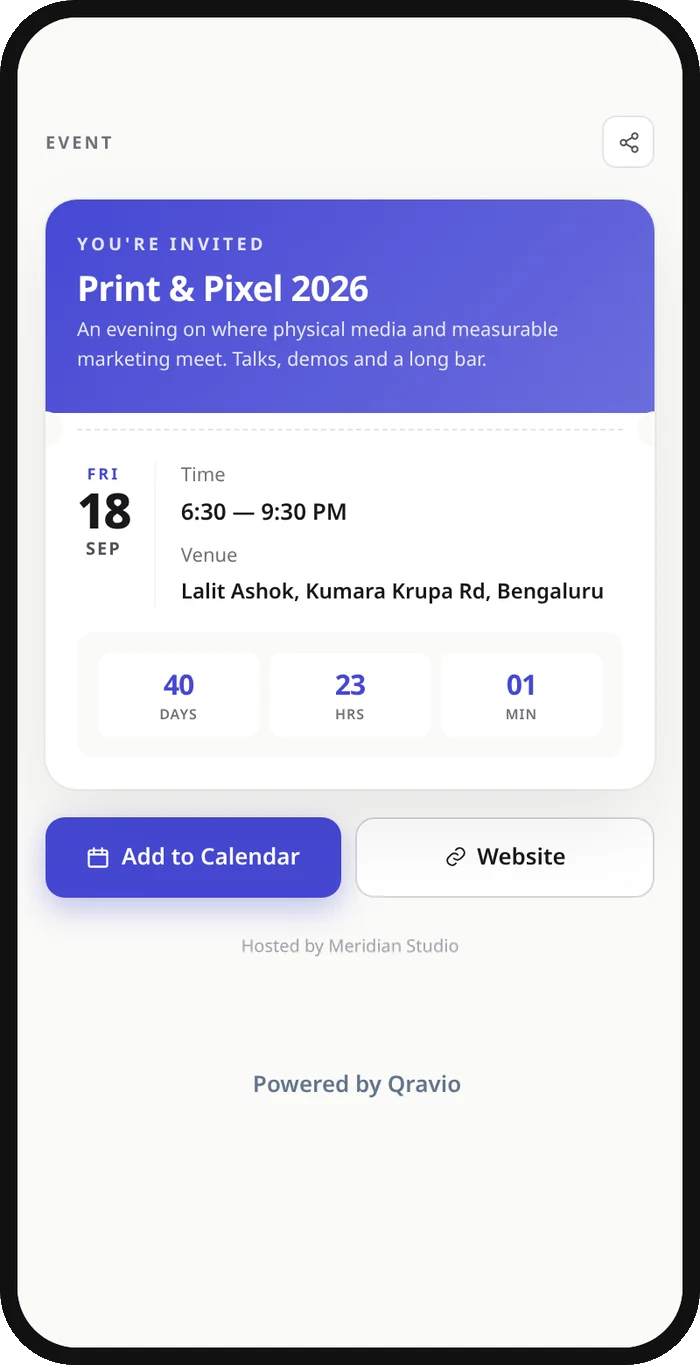
What your event ticket QR opens
A real Qravio scan page, shown with demo content. Every part of it is editable after the code is printed.
Make your Event Ticket QR code
Build it free below, then create an account to make it dynamic — edit it anytime and track scans.
Set up your Event Ticket QR code
- 1Sign up free on qravio.app and create a new dynamic QR code, choosing the event or page type that fits your ticket.
- 2Add the ticket destination, your hosted ticket page, registration/check-in URL, or ticketing platform link such as Eventbrite or Luma.
- 3Customize the page with your event name, date, gate time, venue, and brand color, then set a custom domain so the link reads as yours.
- 4Download the QR as a high-resolution PNG or SVG so it prints crisp on PDF tickets, wristbands, and badges.
- 5Place it on the ticket, email confirmation, or will-call slip, then watch scans roll in live and edit details anytime if plans change.
Why use a Qravio QR code for event ticket
Fix details after tickets ship
Doors-open time pushed back, gate moved, or rain plan triggered? Update the ticket page once and every QR already in attendees' inboxes and wallets shows the new info instantly, no reissued tickets, no confused crowd at the wrong entrance.
Fast, low-friction gate entry
Staff scan each ticket QR to pull up admission details in seconds, keeping lines moving at the door instead of squinting at printed seat numbers or hunting through a guest list on paper.
See live scan and check-in data
Watch scans by time and location in real time, so you know arrival pacing across gates, can spot a rush before it forms, and measure which release or promo channel actually filled the room.
Branded and watermark-free
Qravio's free dynamic tier adds no watermark to the code. The ticket page shows a small 'Powered by Qravio' footer, which Agency white label replaces with your own brand, and a custom domain (Pro and up) keeps the link on your event's brand instead of a generic shortener.
Pro tip
Print the QR at least 2 cm wide with a quiet margin and high contrast so it scans reliably under dim venue lighting and on glossy or wristband surfaces, and test a sample ticket at the actual entrance before doors open.
Event Ticket QR code FAQ
Can I change the event time or venue after tickets are sent out?
Yes. A Qravio ticket QR is dynamic, so it points to a short link you control rather than fixed printed text. Update the doors-open time, gate, venue, or entry instructions in your dashboard and every ticket already emailed or printed reflects the change on the next scan, with no reissue needed.
Can each attendee get their own unique ticket QR code?
Yes. Create a separate dynamic QR per ticket or attendee so each carries its own destination and scan history. Many organizers also generate ticket QR codes in bulk through their ticketing platform and use Qravio to host a branded, editable landing page behind them.
Does scanning the QR check the attendee in at the door?
Scanning opens the ticket's hosted page so staff can verify the holder's event, date, and tier fast, and Qravio logs every scan in real time. For hard check-in validation that marks a ticket as used, point the QR at your ticketing platform's check-in flow, which Qravio links to seamlessly.
Is the event ticket QR code free?
Yes. Qravio's free dynamic tier creates editable, trackable ticket QR codes with no watermark on the code, plus real-time scan analytics and a shared workspace so your door crew can manage entry. Custom domains start on Pro.
Create your Event Ticket QR code
Free to start. No watermark. Editable and trackable in under a minute.