

Event QR Code Generator
An event QR code links to a hosted event page showing your event name, date, start and end times, timezone, venue, organizer, and an RSVP link. On scan, attendees see the details and can save it to Apple, Google, or Outlook calendars. Being dynamic, you can edit the time, venue, or RSVP after printing.
Show event details and add to calendar
This one opens a page Qravio hosts for you — so you can change what people see after the code is printed, and watch every scan land. Start building now, add your email when you want to keep it.
How a Event QR code works
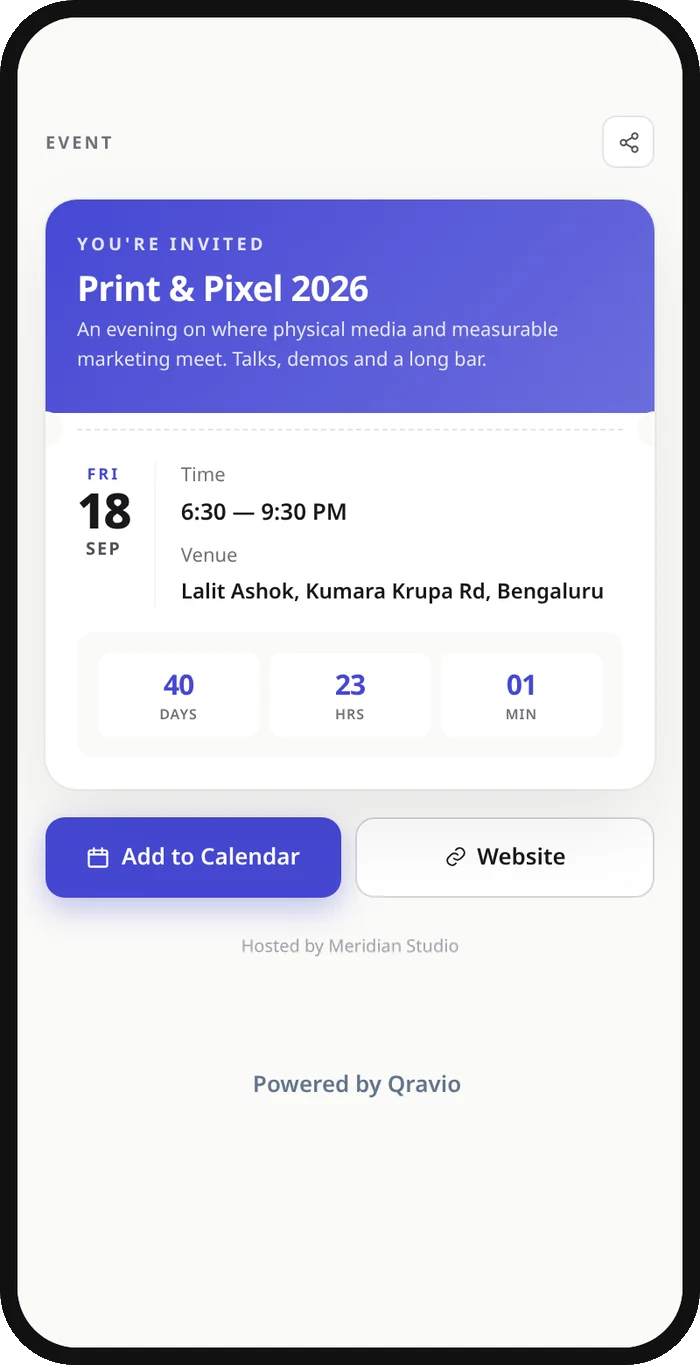
The QR encodes a short Qravio URL, not the raw event data, so the artwork never changes even when details do. When scanned, Qravio serves a mobile event page rendered from your chosen template (ticket, poster, timeline, or invite) with one-tap add-to-calendar and an RSVP button. Edit the date, venue, or registration link anytime and every printed code updates instantly.
What people see after scanning
The page a Event QR code opens on a phone. Yours to design — colours, layout and content all change from the builder.
Popular uses
- Conferences and trade shows that print the QR on badges, banners, and agendas
- Weddings and parties sharing venue, dress code, and RSVP on the invitation
- Concerts and festivals routing ticket holders to schedules and stage maps
- Webinars and workshops where the meeting link or room may change last-minute
- Pop-up events and meetups posted on flyers around town
Why create your Event QR code with Qravio
Reschedule without reprinting
Change the date, start time, or venue after the posters are up and the same QR code shows the new details instantly. No reprint, no stranded attendees.
One-tap calendar saves
Attendees add your event to Apple, Google, or Outlook calendars from the scan page, so the time, timezone, and location land directly in their schedule.
See who is engaging
Real-time scan analytics show how many people viewed the event, when, and from where, so you can gauge interest and time your reminders.
Free with no watermark
Qravio's free dynamic tier creates an event page with RSVP links and no watermark on the code. The page it opens shows a small 'Powered by Qravio' footer, which Agency white label replaces with your own brand. Custom domains start on Pro.
Event QR code FAQ
Can I change the event date or venue after printing the QR code?
Yes. The event QR code is dynamic, so it points to a short Qravio link rather than fixed data. Update the date, time, venue, or RSVP URL in your dashboard and every printed or shared code reflects the change immediately.
Does scanning add the event to the attendee's calendar?
Yes. The scan page includes an add-to-calendar option that exports the event with your date, start and end times, timezone, and location to Apple, Google, or Outlook calendars in one tap.
Can I link to Eventbrite or a registration page?
Yes. Add an RSVP or registration URL (such as Eventbrite, Luma, or your own ticketing page) and an optional event website, and Qravio shows both as buttons on the event page.
Is the event QR code free?
Yes. Event QR codes are part of Qravio's free dynamic tier with no watermark. You get an editable code, a hosted event page, RSVP links, and real-time scan analytics without paying.
Popular use cases
Create your Event QR code
Free to start. No watermark. Make it dynamic to edit it later and track every scan.