

PDF QR Code Generator
A PDF QR code links to a PDF document hosted on Qravio rather than embedding the file itself. When scanned, the phone opens a branded landing page where the viewer reads or downloads the document. Because it is dynamic, you can replace the underlying PDF anytime without reprinting the code.
Open a PDF you can swap without reprinting
This one opens a page Qravio hosts for you — so you can change what people see after the code is printed, and watch every scan land. Start building now, add your email when you want to keep it.
How a PDF QR code works
You upload a PDF to Qravio, which hosts it and assigns a short tracking URL encoded into the QR image. When someone scans it, they land on a viewer page that displays or downloads your document. Since the code points to that fixed URL, you can swap the PDF behind it later and every printed code instantly serves the new file.
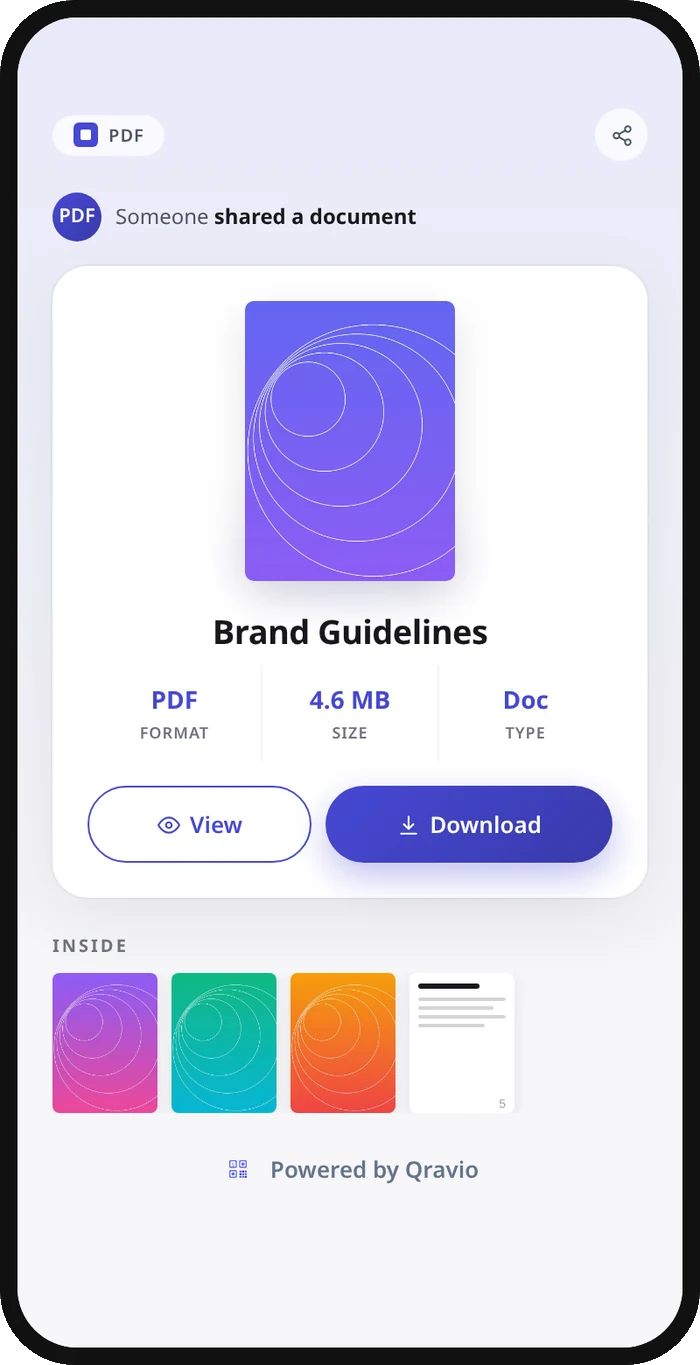
What people see after scanning
The page a PDF QR code opens on a phone. Yours to design — colours, layout and content all change from the builder.
Popular uses
- Restaurant menus printed on tables, signage, or flyers that update each season without reprinting
- Product manuals, spec sheets, and assembly guides attached to packaging or the product itself
- Real estate brochures and floor plans on yard signs and window displays
- Event programs, schedules, and handouts that change up to the last minute
- Resumes, portfolios, and price lists on business cards, posters, or store shelves
Why create your PDF QR code with Qravio
Swap the PDF, keep the print
Fix a typo, update prices, or load next year's catalog by replacing the hosted file. Every flyer, label, and sign already in the wild serves the new document instantly, with no reprint.
See who actually opens it
Track total scans, unique viewers, locations, devices, and times in real time, so you know whether your printed menu or manual is getting read.
Reliable on every phone
The code opens a fast hosted viewer page that works on iOS and Android browsers without an app, so no one hits a broken download or unsupported file.
Free, with a clean code
Make a dynamic, editable PDF QR code on the free plan with no watermark on the code. The page it opens shows a small 'Powered by Qravio' footer, which Agency white label replaces with your own brand. Custom domains start on Pro.
PDF QR code FAQ
Can I update the PDF after printing the QR code?
Yes. The code points to a fixed Qravio URL, not the file's contents, so you can upload a new PDF anytime and every already-printed code serves the updated document immediately, no reprinting required.
Does the PDF itself get encoded into the QR code?
No. A QR image is too small to hold a full document. Qravio hosts your PDF and encodes a short link to it, which is what makes the code dynamic, trackable, and editable after the fact.
Do viewers need an app to open the PDF?
No. Scanning opens a hosted landing page in the phone's browser where the PDF displays inline or downloads with one tap, on both iOS and Android.
Is the PDF QR code really free?
Yes. The code is free, carries no watermark, and comes with real-time scan analytics. The hosted page shows a small 'Powered by Qravio' footer; on Agency, white label swaps it for your own logo and text.
Popular use cases
Create your PDF QR code
Free to start. No watermark. Make it dynamic to edit it later and track every scan.