

QR Code for Instagram
A QR code for Instagram lets anyone scan with their phone camera to open your profile, hit follow, or reach your link-in-bio instantly — no typing your handle. With Qravio's dynamic code, you point it at your Instagram URL once, then swap the destination later (new handle, campaign link) without reprinting.
How QR codes work for instagram
You generate one QR code and set its destination to your Instagram profile URL (instagram.com/yourhandle) or your link-in-bio page. When a follower scans it with their phone camera, the Instagram app or browser opens straight to your profile, ready to follow. Because Qravio codes are dynamic, you can repoint the same printed code to a different handle, a Reel, or a campaign landing page anytime — the QR image never changes.
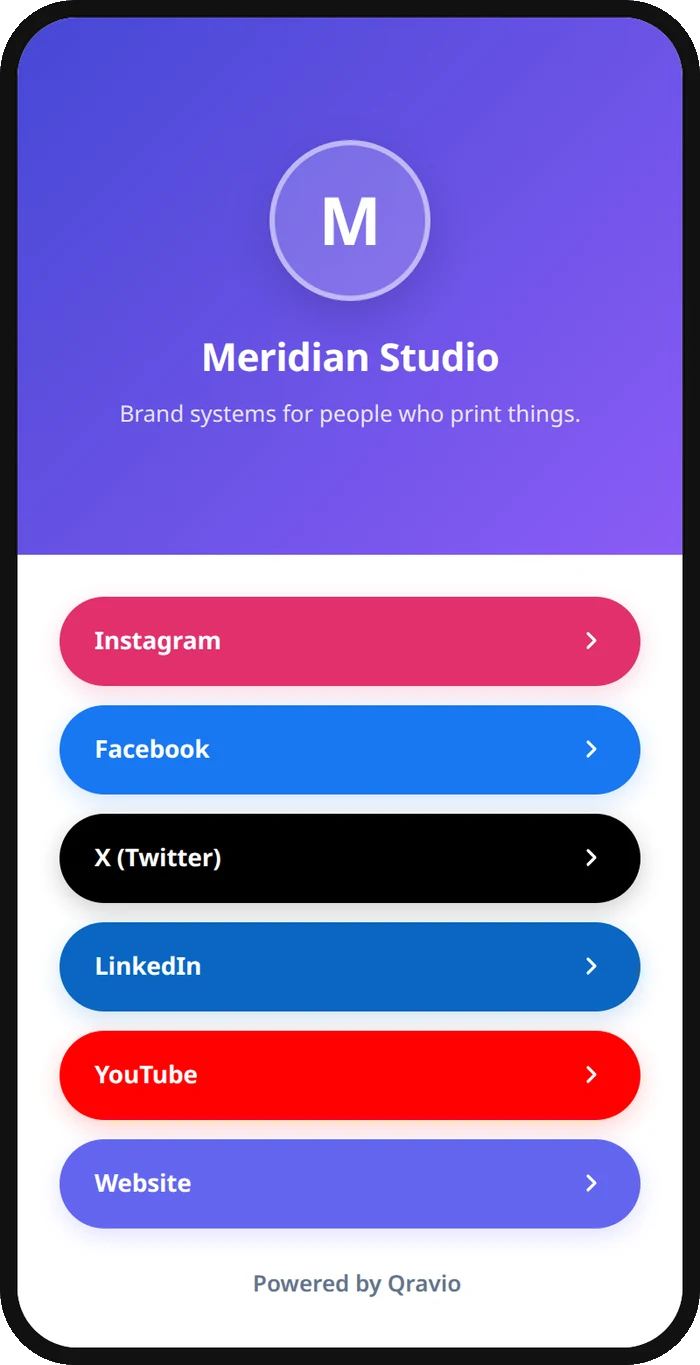
What your instagram QR opens
A real Qravio scan page, shown with demo content. Every part of it is editable after the code is printed.
Make your Instagram QR code
Build it free below, then create an account to make it dynamic — edit it anytime and track scans.
Set up your Instagram QR code
- 1Sign up free at qravio.app and choose a Website/URL QR type (or vCard if you want a follow-me landing page).
- 2Paste your Instagram destination — your profile (instagram.com/yourhandle), a specific Reel or post, or your link-in-bio URL.
- 3Customize the code: add your logo, brand colors, and a rounded style so it matches your feed aesthetic.
- 4Download the QR as a high-resolution PNG or SVG with no watermark, ready for print or screen.
- 5Place it on packaging, business cards, story highlights covers, event banners, or your storefront — then watch scans roll in.
Why use a Qravio QR code for instagram
Grow followers offline
Turn packaging, flyers, pop-up booths, and storefront windows into follow buttons. One scan opens your profile so shoppers can follow before they leave — no searching for your handle or misspelling it.
Repoint without reprinting
Rebranded your handle, launched a new campaign, or want to push a Reel this week? Change the destination in Qravio and every printed code updates instantly. The dynamic code stays the same image forever.
See what's actually working
Real-time scan analytics show how many people scanned, when, and from where. Compare the code on your packaging versus the one on your event banner to learn which placement drives the most followers.
Free and watermark-free
Qravio's dynamic tier is genuinely free with no watermark stamped on your code, so it looks clean on premium packaging and branded merch — no surprise paywall to keep it editable.
Pro tip
Add the QR code as a Story Highlight cover and to your physical packaging at the same time, but use two separate Qravio codes pointing to the same profile — that way the scan analytics tell you exactly which channel (online vs. in-hand) is converting browsers into followers.
Instagram QR code FAQ
Will the QR code take people straight to my Instagram profile?
Yes. Set the destination to instagram.com/yourhandle and scanning opens your profile in the Instagram app (or browser), ready to follow with one tap. You can also point it at a specific Reel, post, or your link-in-bio page instead.
If I change my Instagram handle, do I have to make a new QR code?
No. With Qravio's dynamic code you just update the destination URL in your dashboard, and every already-printed code redirects to your new handle automatically. The QR image itself never needs to be reprinted.
Can I track how many people scanned to follow me?
Yes. Qravio gives you real-time scan analytics — total scans, timing, and location — so you can see whether your packaging, flyers, or event signage is driving the most profile visits.
Is the Instagram QR code really free with no watermark?
Yes. Qravio's dynamic tier is free and adds no watermark to your code, so it stays clean and on-brand on merch, packaging, and printed materials while remaining fully editable.
Create your Instagram QR code
Free to start. No watermark. Editable and trackable in under a minute.