Location QR Code
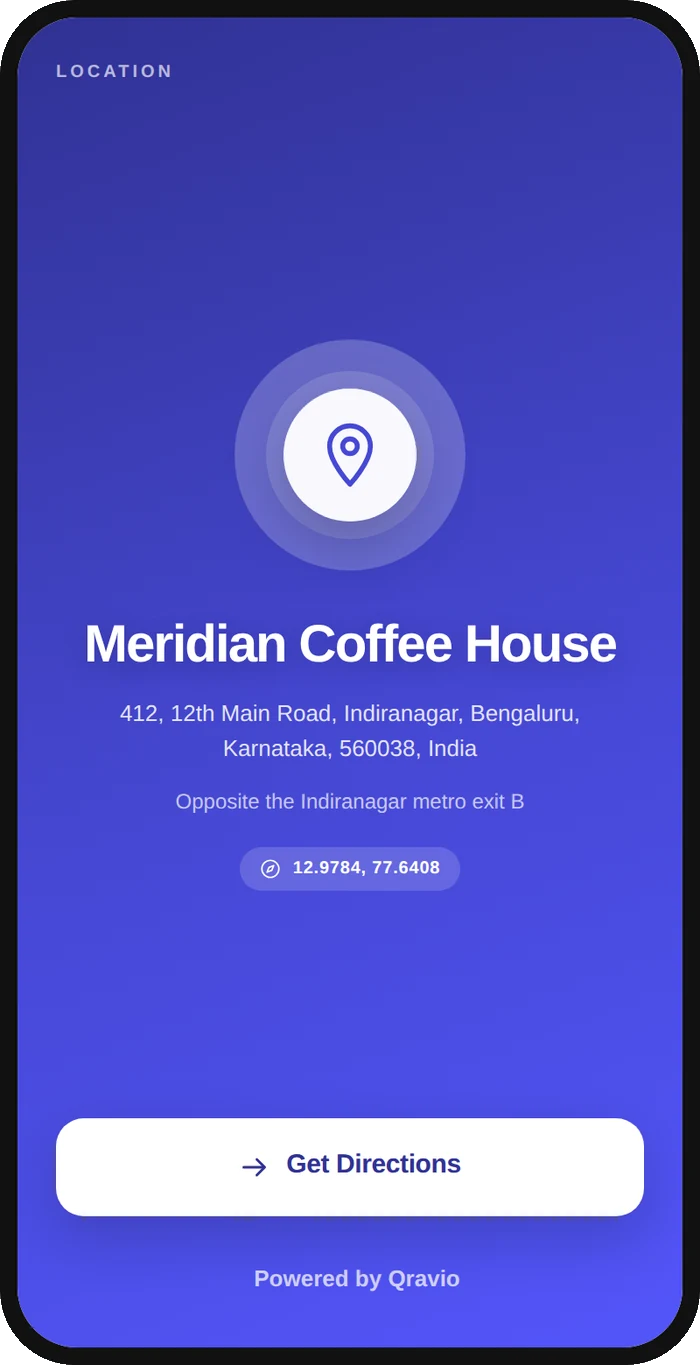
A location QR code sends whoever scans it to directions for one specific place. Qravio's version is dynamic: the printed pattern holds a short Qravio link, and on scan we serve a small page with the place name, the full address, an optional landmark line and separate buttons for Google Maps, Apple Maps and Waze — or redirect straight into a maps app if you would rather skip the page. Because the address lives in your dashboard instead of in the printed pixels, you can correct it after the sticker is already on the door, and every scan is counted.
Open a hosted Location page
This one opens a page Qravio hosts for you — so you can change what people see after the code is printed, and watch every scan land. Sign up or log in to start building.
How a Location QR code works
When you create a location QR code you save a place name, an address, an optional landmark line and, if you have them, a latitude and longitude. Only a short Qravio link is encoded into the pattern. On each scan that link resolves at our edge, where we compose a standard maps URL from the fields you saved: with coordinates, the URL asks for that exact point on the earth; without them, it asks the maps app to search for your address as text. Nothing is looked up in advance and no maps service is called at any stage — we assemble a link and hand it to the phone, which is why a location QR needs no API key, adds no waiting and cannot be knocked out by anyone else's quota. You then choose what a scanner sees. The default is a landing page carrying the address, the landmark line and one button each for Google Maps, Apple Maps and Waze, so nobody is pushed into an app they never use, plus an optional Call button. Switch on "open Maps directly" and the scan becomes a redirect into the maps app instead; the scan is still recorded on the way through, which is the practical difference between this and a maps link frozen inside a static code. Both modes read the same saved record, so editing the address, moving the pin, or changing your mind about the landing page takes effect on the very next scan with nothing reprinted.
What people see after scanning
The page a Location QR code opens on a phone. Yours to design — colours, layout and content all change from the builder.
Popular uses
- Put a code on a shop, salon or bakery door so a customer gets turn-by-turn directions instead of a printed address line they have to retype into a maps app
- Point patients at the right gate, block and floor of a clinic, diagnostic lab or coaching centre, where the street name on its own leaves them in the wrong lane
- Stand a real-estate site board on a plot that has no postal address yet, where pasted coordinates are the only thing that can pin it at all
- Mark the pickup counter on a restaurant table tent, delivery bag or invoice so drivers and customers stop circling the block
- Print a venue on a wedding invitation, exhibition pass or conference badge weeks before the hall is finalised, then correct the address later without a reprint
- Route field staff and walk-in customers to a branch, warehouse or service centre from a van decal or catalogue that will outlive the current lease
Why create your Location QR code with Qravio
Fix a wrong address without reprinting
This is the one thing a maps link pasted into a static code can never do. The address, the landmark and the pin live in your dashboard, so a shifted branch, a corrected building number, or a pin that turned out to be 200 metres off is a two-minute edit. Every sticker, board and menu already in print starts sending people to the right place on the next scan.
An exact pin instead of a guessed one
Typing an address makes the maps app run a search, and a search can settle on the wrong sector, the nearest well-known landmark, or a same-named road in another city. Latitude and longitude skip searching entirely and ask for one point. Paste them once and the pin stops being a guess — it is the most useful field on the form for anything in a new layout, a market lane, an industrial estate, a gated campus or a village.
Google Maps, Apple Maps or Waze, scanner's choice
The landing page offers all three side by side, along with your landmark line and an optional Call button, so an iPhone user is not dropped into an app they never opened and a driver can use the one they navigate with every day. Prefer the shortest path? Turn on direct mode and the scan skips the page altogether.
Scans are counted in both modes
Every scan is logged with time, approximate location and device, including in direct mode where the visitor never sees a page at all. That tells you whether the door sticker, the invoice or the site board is what people actually scan — something a plain printed maps link can never report.
What it is not, and who sees the address
Qravio composes a maps URL from what you type and hands it to the phone. We have no partnership with any maps provider, run no place lookup, and cannot mark a listing as verified — what a map shows for an address or a coordinate is between that app and its own data. The address is also public by design: anyone who scans the code, and anyone who follows the short link, sees it without an account. If you run a business from your home, weigh that before printing at scale.
Location QR code FAQ
How is this different from putting a Google Maps link in a website QR code?
Mostly in what you can do after printing. A maps link inside a static code is fixed forever and reports nothing back; a dynamic location QR keeps the address in your dashboard, so you can correct it later, and it logs every scan. The form also asks the questions a single URL field cannot — a landmark line, exact coordinates, a phone number — and the landing page offers Apple Maps and Waze beside Google Maps, which one Google link cannot. If you already have a maps link you are happy with and will never need to change, a website QR is a perfectly reasonable choice and we would rather say so.
Why should I add latitude and longitude instead of just typing the address?
Because an address is a search, not a location. When the code carries only text, the maps app looks it up and picks its own best match, and in a new layout, an industrial estate, a market lane or a village that match is regularly a few hundred metres out, or in the wrong locality entirely. Coordinates ask for one specific point and take the guesswork away. The place name and landmark help a human finish the last fifty metres; coordinates are what get the blue line to the right gate.
How do I find the coordinates for my place?
Open Google Maps on your phone and press and hold on the exact spot — your doorway, your gate, the entrance customers actually use. The coordinates appear at the top or in the place card, and tapping them copies the pair. Paste the whole pair into the builder and it splits them across the latitude and longitude fields. Then use the preview link in the builder to open the maps URL yourself and confirm the pin lands where you were standing. Do that before a print run, not after it.
Can the scan open the maps app immediately, with no page in between?
Yes. Switch on "open Maps directly" and a scan redirects straight to the maps URL, and the scan is still recorded on the way through. The landing page is the default because that is where Apple Maps, Waze, the landmark line and the Call button live, and where somebody reading a poster can check the address before they start walking. Either setting can be changed later on a code that is already printed.
Who can see the address on a location QR code?
Everyone who scans it. The landing page is public and needs no account, so treat the address the way you would treat it on a signboard outside. This matters most for a sole proprietor whose registered business address is their home, because the code will publish that home address to every person who picks up the flyer. There is nothing hidden or optional about it — publishing the address is what makes the code work — so if you would not print the address on the poster itself, use a shop, clinic, studio or co-working address, or point the code at a nearby pickup spot you are happy to make public.
Is Qravio connected to Google Maps, and does a location QR verify my business?
No to both. We build a standard maps URL out of the fields you enter and pass it to the phone. There is no partnership, no maps API behind it and no place lookup on our side, which is also why the feature needs no key and costs nothing to run. Whatever a maps app shows for your address or coordinates comes from that app's own data, and scanning your code does not add, claim or verify a listing there. A verified business listing is something you set up with the map provider directly, and a location QR neither replaces nor affects it.
Create your Location QR code
Free to start. No watermark. Make it dynamic to edit it later and track every scan.